What is MojoDocs and what does it do?
MojoDocs helps you process files without sending them to any server. It solves the risk of data leaks when using online tools for sensitive business documents or photos. The platform supports tools for common file types like PDFs, images, spreadsheets and videos. These include batch renaming, format conversion, and compression. All processing happens on your device using WebAssembly (WASM), a way to run fast, heavy-duty code directly in your browser. This means your files never leave your machine. For example, you can compress 500+ high-res photos by 80% locally, saving space without uploading anything. See the full list of tools and how they work on the MojoDocs project page.
How is MojoDocs different from other online file tools?
MojoDocs does not upload your files to any server. Every file stays on your device and is processed locally, so sensitive documents like NDAs or contracts never leave your control. This means no tracking of what you do or which files you open.
It is free to use and offers strong security, matching or even exceeding paid corporate tools. There are no usage limits, no ads, and no account sign-up. You open the tool in your browser and start working right away.
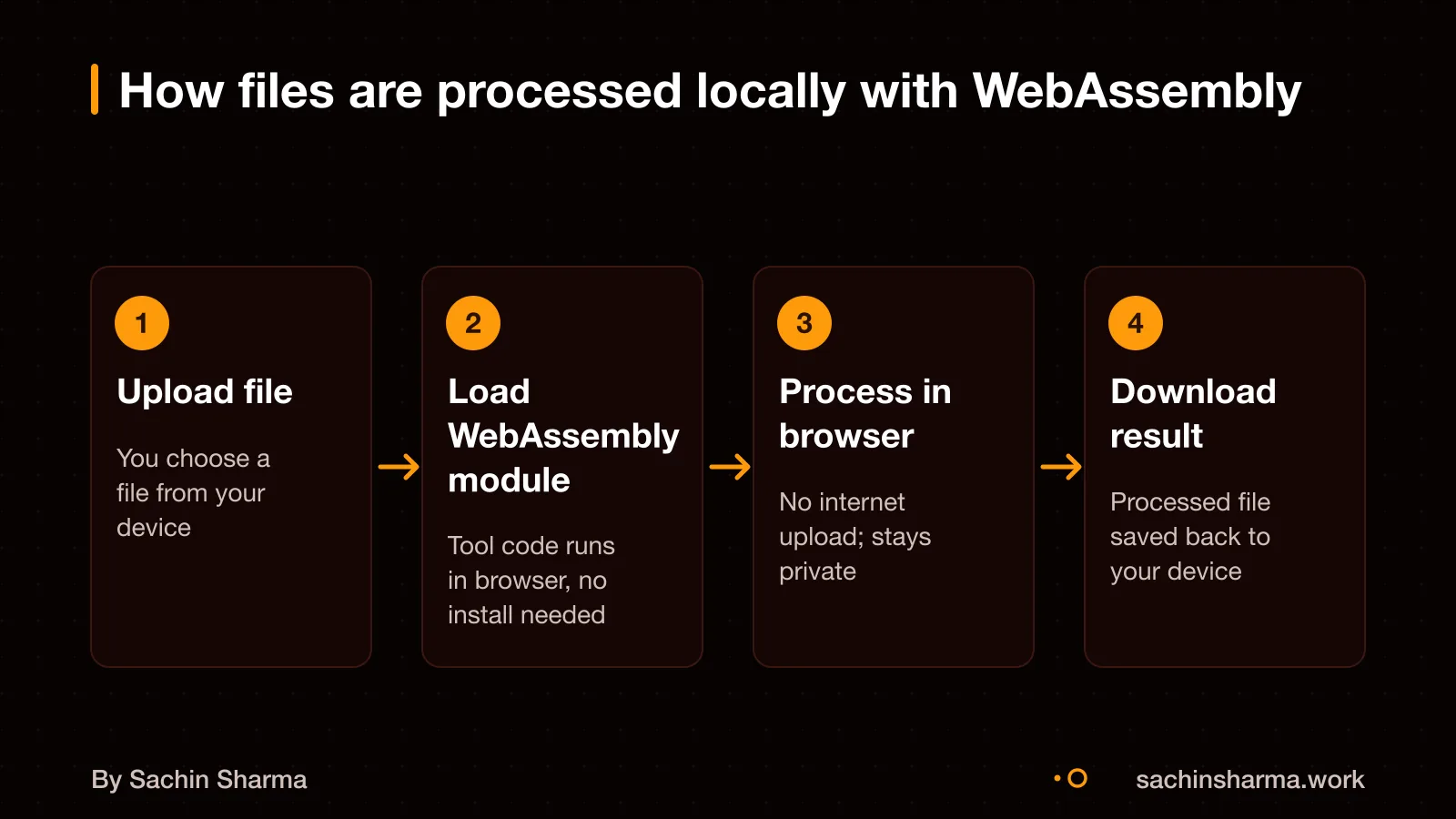
For example, if you split a PDF or convert a DOCX to Markdown, that task runs inside your browser using WebAssembly. No copy is sent online, no history is saved, and no data is stored after you close the tab.
What does 'built with WebAssembly' mean in plain terms?
WebAssembly is a compact binary format that runs in web browsers at near-native speed. It lets you run code written in languages like C, C++ and Rust directly in the browser. This means heavy tasks, such as file conversion or encryption, can be done locally on your device without sending data to a server.
WebAssembly does not replace JavaScript but runs alongside it. JavaScript handles the user interface, while WebAssembly runs performance-heavy code in the background. For example, a PDF tool might use JavaScript to show buttons and upload fields, but use WebAssembly to compress or split the file.
This setup keeps processing fast and private. Since the code runs in your browser, your files do not need to leave your device. However, it requires more from your device’s hardware, especially memory and CPU power, which we will cover next.
When is a WebAssembly-based tool better than a server-based one?
A WebAssembly-based tool is better when you need stronger privacy, lower infrastructure costs, or instant processing without uploads. It improves privacy because the tool runs on your device. Since all processing happens locally, there is no need for cloud servers, reducing infrastructure costs to almost zero. It also eliminates upload delays, your file does not need to travel online before being processed. For example, converting a PDF to Excel in MojoDocs starts immediately in your browser, with no waiting for upload or risk of data exposure. This makes WebAssembly ideal for sensitive documents like invoices or legal forms.
If you are unsure whether your app needs a server. Read Do I need a server for my app? to compare trade-offs between local and server-based architectures.
When WebAssembly is not the right choice
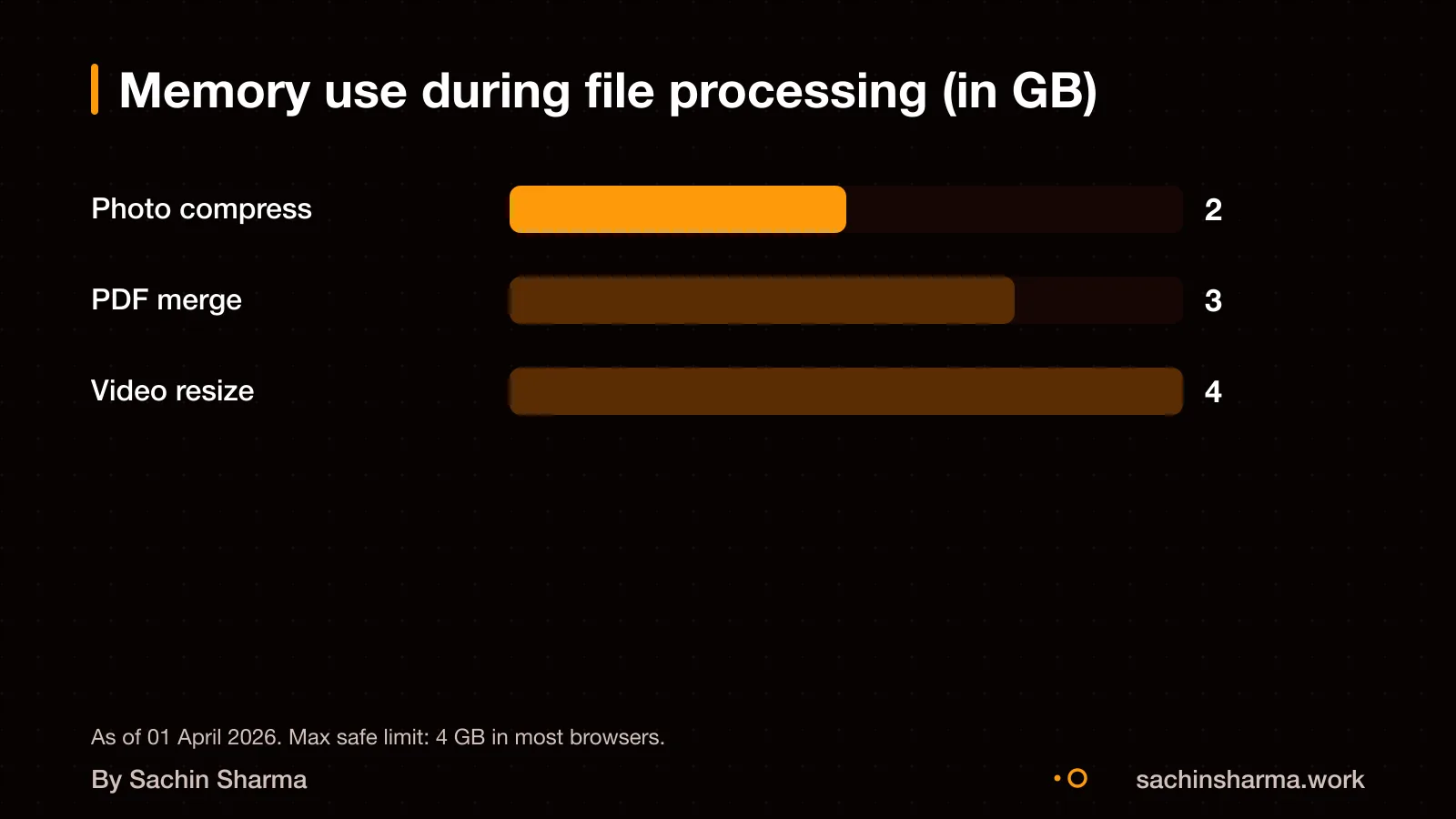
WebAssembly does not improve performance when tasks are limited by input-output speed or heavy browser interface updates, because the bottleneck is not in computation. For large datasets, browser memory limits cap WebAssembly use at 2 to 4 GB, which may not be enough for very large files. Building with WebAssembly adds complexity in tool setup, debugging, and linking with JavaScript code. Some websites misuse WebAssembly to hide cryptomining scripts or obfuscated malware, making it harder to detect harmful behaviour. You can debug WebAssembly modules using Firefox Developer Tools, which show the text form of the code. This helps when checking what a module does, but requires technical skill. For Indian small businesses, this means WebAssembly is not ideal if your users have older devices, need to process large files, or lack developer support.
How was C and C++ code turned into browser-run tools?
C and C++ code can be compiled into WebAssembly (WASM) using tools like twr-wasm. These tools compile native C/C++ code into WASM bytecode, which runs inside the browser at near-native speed.
The compiled `.wasm` modules can be loaded in JavaScript. Once loaded, JavaScript can directly call exported functions in the WASM module, passing data through memory buffers.
Yes, JavaScript can call functions in WASM modules. For example, a PDF compression function written in C++ can be compiled to WASM, then triggered from a browser button click via JavaScript. Data moves through a shared memory space, and results return without network calls.
MojoDocs runs 1,100+ file-processing tools locally.
Can I verify that files never leave my device?
Yes, you can confirm that files never leave your device by using browser developer tools and WebAssembly analysis tools.
Open your browser’s DevTools and go to the Network tab before using MojoDocs. Process a file and watch for any outgoing requests. If no network activity appears during processing, it means no upload happened. MojoDocs guarantees that 0 Bytes are Sent to the Cloud.
You can also inspect the WebAssembly module for hidden calls. Use tools like the WebAssembly Binary Toolkit (WABT), diswasm, Binaryen, or wasm-tools to reverse-engineer the binary. These tools let you see what system calls the code makes, helping confirm no external communication is built in.
As an estimate, assuming you have basic technical skill, checking the Network tab takes under 2 minutes. Reverse-engineering a WASM binary takes longer and requires familiarity with low-level code. The open-source toolchain is small and focused, with each tool serving a specific role.
What evidence shows MojoDocs actually works?
MojoDocs has a 4.8 out of 5 rating based on 12 reviews, with 83% of them being five-star ratings. This shows that most users are highly satisfied with its performance and reliability. The platform is built using twr-wasm, which provides comprehensive examples and documentation for developers. These resources help ensure that the tools work as intended and can be maintained or extended. While the number of reviews is small, the high rating and detailed documentation support that MojoDocs functions effectively for its users.
What are the legal rules for a tool like MojoDocs in India?
The Digital Personal Data Protection (DPDP) Act, 2023 does not apply to personal data processed by an individual for any personal or domestic purpose. This means if you use MojoDocs only for your own files and not for business data processing. The law does not require user consent or compliance steps. The DPDP Act applies only to digital personal data processed within India, whether collected digitally or later digitised. However, it does not cover data processed by an individual for personal use. For example, if you run a tool locally to compress or convert your own PDFs or images, no consent is needed under DPDP. But if the same tool is used by a business to process customer data, then the Act applies and compliance is required. The law has not yet come into force as no date has been appointed by the Central Government.
MojoDocs processes files directly on the user's device and does not send bytes to the cloud. For business use involving personal data, the Act may apply. However, legal advice should be taken for your specific use case, especially if handling employee, customer or client data.
Not sure if your tool needs DPDP consent? Tell me your use case in two lines and I will say yes or no.
Message me on WhatsAppHow much did MojoDocs cost to build?
The cost to build MojoDocs is not known [unknown]. As an estimate, a similar on-demand app in 2026 costs between $30,000 and $300,000. This range depends on the number of tools, integration complexity, and testing across devices. Factors that affect cost may include the use of WebAssembly, offline-first design, and device compatibility [assumption: based on app complexity and target market]. The average project falls between $60,000 and $150,000.
Want a number for your idea? Send one line on WhatsApp. I reply with what drives the cost and what to cut.
Want a number for your idea? Send one line on WhatsApp. I reply with what drives the cost and what to cut.
Message me on WhatsAppWhat affects the timeline for building a WebAssembly tool?
Development time for a WebAssembly tool depends on toolchain setup, debugging complexity, and how tightly it must work with JavaScript. These factors often add delays not seen in standard web projects. As an estimate, assuming complexity in debugging and integration adds 20 to 30% to development time. For example, linking C++ code to a React frontend using Emscripten may require rewriting interface logic multiple times. Common delays include fixing memory leaks in WASM modules and handling type mismatches across the JavaScript-WASM boundary. Each tool added to the platform must be tested for browser compatibility and performance, which slows scaling.
When this advice is wrong
When this advice is wrong
- Local-first WebAssembly is not suitable if you process files larger than 2 to 4 GB. Browser memory limits cap how much data a tool can handle at once, so very large datasets must use server processing instead. For example, bulk video rendering or big-data analytics may fail locally.
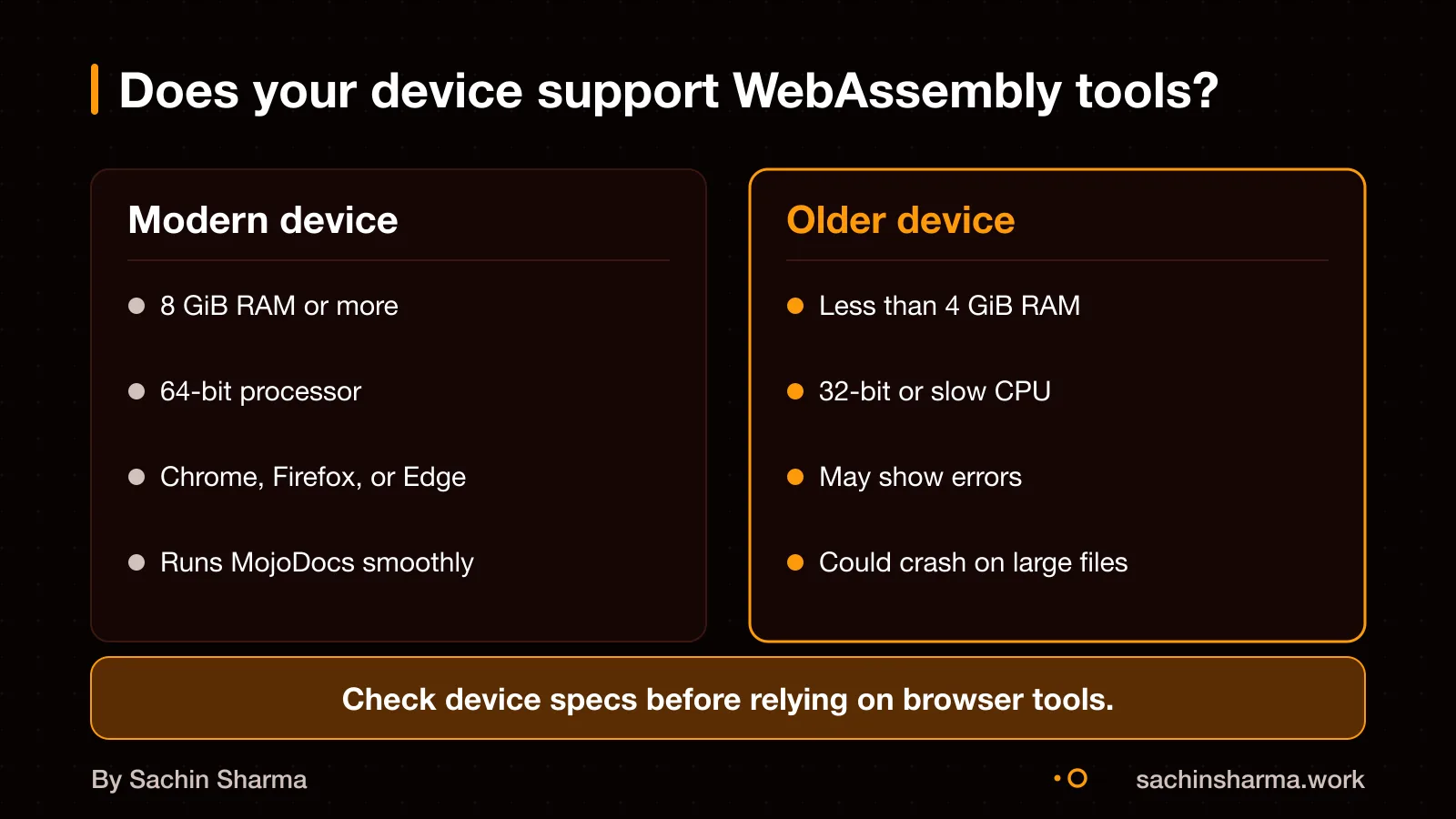
- If your users rely on low-end devices with less than 8 GiB RAM, MojoDocs-like tools may run slowly or crash. WebAssembly needs modern hardware to run efficiently, and older smartphones or budget laptops may not support smooth performance.
- When offline use is not needed, a server-based tool can be simpler and more reliable. If your team always has internet and values collaboration over privacy, centralised processing avoids device limits and sync issues.
- If your team lacks skills in C/C++ or Rust, maintaining WebAssembly tools becomes risky. Each update to the source code requires recompilation and cross-browser testing, which demands niche expertise not found in all web teams.
Related reading: DPDP Act consent guide, Why is app development so expensive?.
Next step: message me on WhatsApp with what you want to build. No forms, no sales team.
Message me on WhatsAppAssumptions behind the numbers
- Assumption: 8 GiB RAM is a working baseline for many tools.
- Assumption: User satisfaction is reflected in the 4.8/5 rating.
- Assumption: Device performance varies and must be tested.
The story, chapter by chapter
For MojoDocs users (self-reported). Performance depends on device RAM and CPU — test before use. Figures are as reported by the client and have not been audited.
- tools
- 1110run in-browser with WebAssembly
- rating
- 4.8based on user reviews
The ask
Run 1,110+ tools without uploading files
1,110+ tools. Zero uploads. Total privacy.
Users wanted file tools that work instantly and respect privacy. Server-based tools either cost too much or leak data. MojoDocs had to solve both by staying local.
The decision
WebAssembly over server APIs
Local tools. No servers. No leaks.
WebAssembly (WASM) runs code in the browser at near-native speed. That meant all tools could run locally, with files never leaving the device. No servers. No tracking. No limits.
What changed
Files stay local, tools run fast
Fast tools. Safe files. Strong device needed.
Before MojoDocs, users had to choose between slow uploads or weak privacy. Now they get both speed and safety, but only if the device has enough RAM and CPU.
Why device matters
RAM and CPU decide if it works
Test your device. 8 GiB RAM is a start.
WebAssembly tools run in-browser, so older or low-RAM devices may struggle. Users report success with 8 GiB RAM, but results vary. Test before use.
Three things to take away
- Privacy is structural, not optional — MojoDocs never uploads files.
- Speed depends on the device — test with your own files and hardware.
- WebAssembly enables powerful local tools, but not for very large datasets.
- User reviews show 4.8/5 satisfaction — mostly for speed and privacy.
Questions people ask
Yes, WebAssembly runs on most mobile phones, but performance depends on the device's RAM and CPU. WebAssembly currently has strict memory limits (often capped at 2GB to 4GB depending on the browser). Test your tool on target devices before rollout.
You can run MojoDocs on a budget laptop only if it has high RAM and a modern CPU. Older devices may crash due to memory limits in browser-based WebAssembly, which cap large dataset processing at 2 to 4 GB. Check your device's specs before use.
WebAssembly runs in a sandbox and cannot access the network or files directly without host imports. However, obfuscated binaries can hide malware, cryptominers or licensing checks, so only run trusted or audited modules.
Start with the WASI SDK and use CMake for better portability across platforms. This setup replaces older Makefile systems and simplifies builds for Windows, macOS and Linux targets.
Production risks include debugging difficulty, complex toolchains, and interoperability issues with JavaScript. WebAssembly binaries can also hide malware or cryptominers, requiring reverse engineering to audit. Plan for testing and tooling.
You should not trust a WebAssembly binary blindly. Use tools like WABT or diswasm to reverse-engineer it and check for hidden network calls or file operations. Verify what the code actually does before running it.
Yes, MojoDocs works 100% offline with no server dependency during file processing. No data is sent to the cloud, and all tools run locally using WebAssembly, so your files stay private and accessible without internet.