What is a web app, and how is it different?
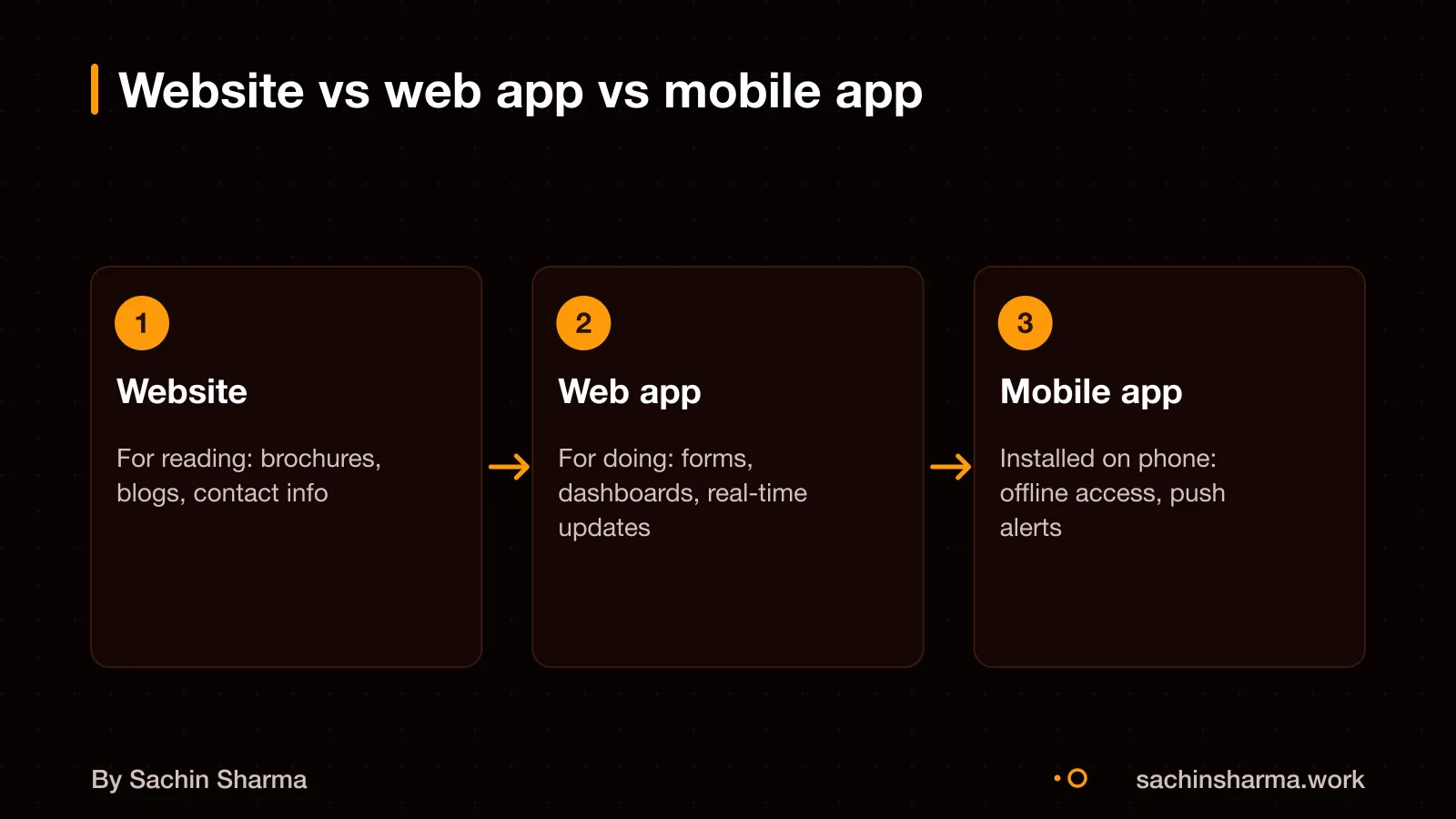
A web app lets users do tasks like fill forms, upload files or track progress, unlike a website that only shares information. You should choose a web app when your users need to interact with data or tools regularly. A mobile app is better when you need deep phone features like sensors, notifications or offline use. A progressive web app (PWA) is a web app that acts like a mobile app: it can be installed. Work offline and connect to your device. PWAs matter because they give some mobile app benefits without requiring a download from an app store. For example, a field team can use a PWA to log customer visits even with poor internet. If you need full mobile performance or access to the camera, microphone or GPS in the background, a native mobile app may be better. Mobile app development in Flutter covers that path.
What is an MVP, and when should you build one?
An MVP is a working version of your product with just enough features to solve a core problem for users. It is not a half-built or broken product, but a focused tool to test your main idea in the real market. You should build an MVP when you want to check if customers actually need your solution before spending on a full app.
Building an MVP first reduces financial risk by limiting work to essential features only. It is more cost-effective than launching a full product with many features no one uses. For example, if you plan a delivery app, your MVP might only let users order from one store. Pay online, not include driver tracking or loyalty points.
An MVP helps you confirm demand early with real users. You learn what works, what to improve, and whether to continue or change direction. This saves time and money compared to building a full product based on guesses. Once you have feedback and traction, you can add more features with confidence.
Will a web app work if my customers use phones?
Yes, a web app works well on phones if your users need basic access and you want to launch fast. It opens in a browser and adjusts to fit small screens. A Progressive Web App (PWA) can bridge the gap. It works like a mobile app: you can install it on the home screen, use it offline, and it can run in the background. For example, a simple booking form works fine as a web app. But a field-worker tool that scans barcodes needs a mobile app. A PWA gives you some app-like features without building two native apps.
How much does a web app or MVP cost?
A web app or MVP can cost from ₹4,000 to over ₹1.1 crore, depending on its scope. Simple MVPs cost $5,000 to $15,000+ (₹4.2 lakh to ₹12.6 lakh+) and take 2 to 4 weeks. Complex MVPs with AI or custom workflows cost $50,000 to $150,000+ (₹42 lakh to ₹1.1 crore+) and take 6 to 12+ weeks.
Costs go up with more screens, user roles, third-party integrations, or real-time features. They go down with reusable templates, fewer features, or using no-code tools for parts. As an estimate, using the current exchange rate of ₹84 per dollar, the ranges in rupees are approximate.
Freelancer bids in India vary widely. A Shopify store project has an average bid of ₹4,178. A two-day business website build averages ₹35,701. These may not reflect full MVP costs but show that simple jobs attract lower bids. Your project’s cost depends on its specific needs, not averages.
For clarity on your idea, compare it to the examples above. Ask yourself: does it need login, payments, dashboards, or AI? Each adds cost.
What it costs to build an app in India covers how different models compare.
Want a cost range for your web app idea? Send one line on WhatsApp. I reply with what drives the cost and what to cut.
Message me on WhatsAppHow long does it take to build a web app or MVP?
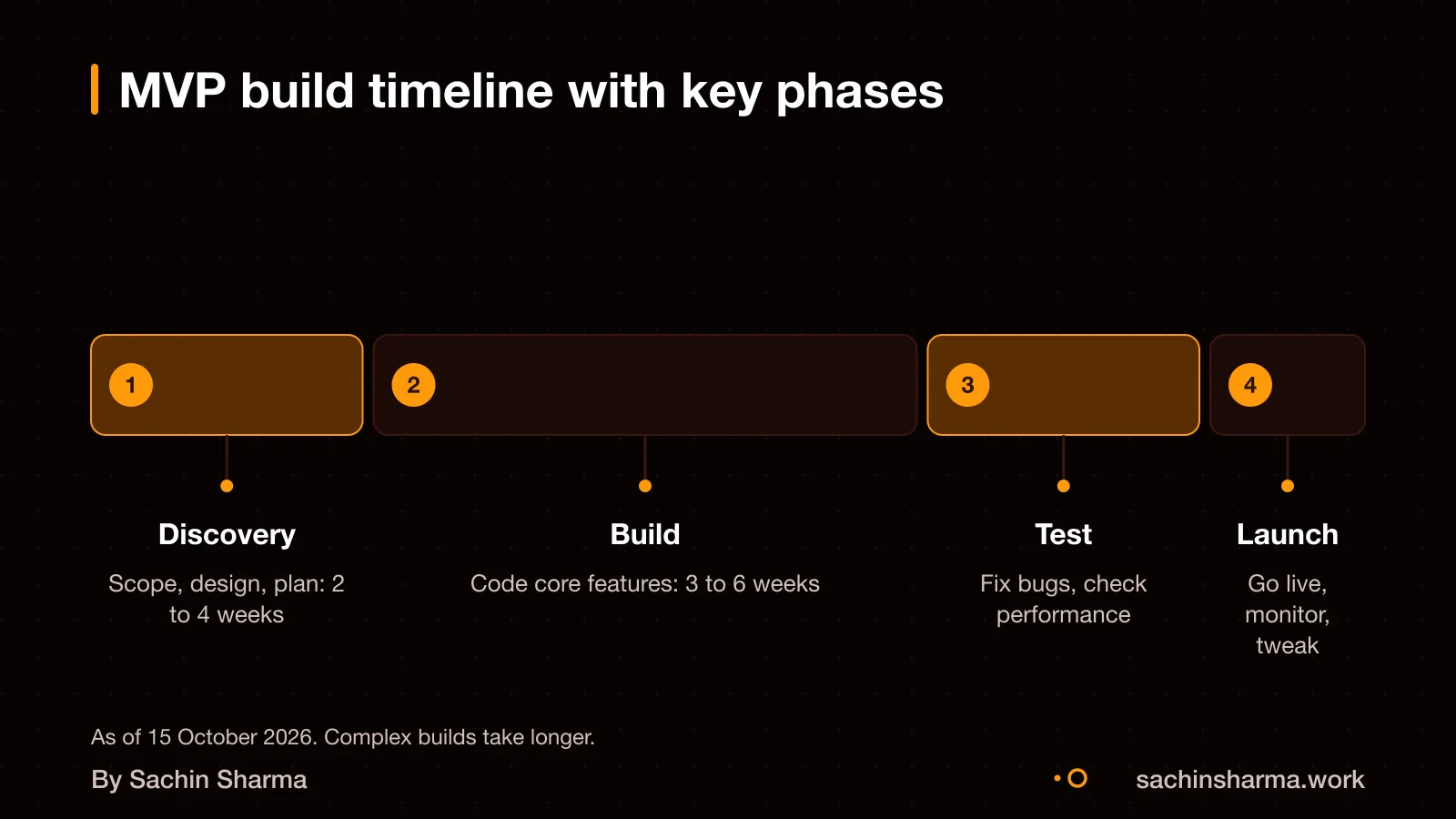
A simple web app or MVP takes 2 to 4 weeks. A standard one 3 to 6 weeks, and a complex one 6 to 12+ weeks. These times are for the build phase only. A full roadmap, including discovery, planning, testing and launch, takes 12 to 14 weeks on average. This longer timeline includes time to define your goals, map user flows, review designs, build features, test for bugs and prepare for go-live.
No-code or AI tools like Hostinger AI Builder can create a basic web app in days or weeks, much faster than custom code. These tools work well for simple sites with forms, content or listings. But they limit your control over design, logic and data. For a unique product with custom workflows or integrations, custom development is better.
For example, a habit tracker with offline sync (like Loopin) would be a simple MVP. A multi-tenant platform with user roles, dashboards and reporting (like the one built for a family-run conglomerate) would be complex. The 12 to 14 week roadmap ensures time is set aside not just for coding, but for your feedback and course corrections.
How does the process work with you?
The process starts with your idea and ends with a working web app or MVP, delivered in clear steps. An MVP roadmap defines the goals, scope, milestones, resources, and timeline needed to bring a focused first version of a product to market. You need to share your core problem, target users, and what you want to achieve. This helps me prioritise features that test your main hypothesis.
Milestones are defined around key outcomes, not just tasks. Each milestone ends with a working version you can test. I use real projects to shape the plan, like how EHR Copilot turned session notes into structured data. Or how MojoCinema delivered search and watchlist features in phases. You get updates at every stage, with working code, not just promises.
This step-by-step approach ensures nothing is missed.
Next step: message me on WhatsApp with what you want to build. No forms, no sales team.
Message me on WhatsAppHow do we communicate during the build?
We use common tools like WhatsApp and email for project updates and messages. Weekly progress reports may include what was done, what is next, and any blockers. Feedback is collected through short calls or written notes, and I act on it within 48 hours. This keeps things clear and fast.
Instead, we keep in touch through simple, direct tools you already use.
Who owns the code, domain, and accounts after delivery?
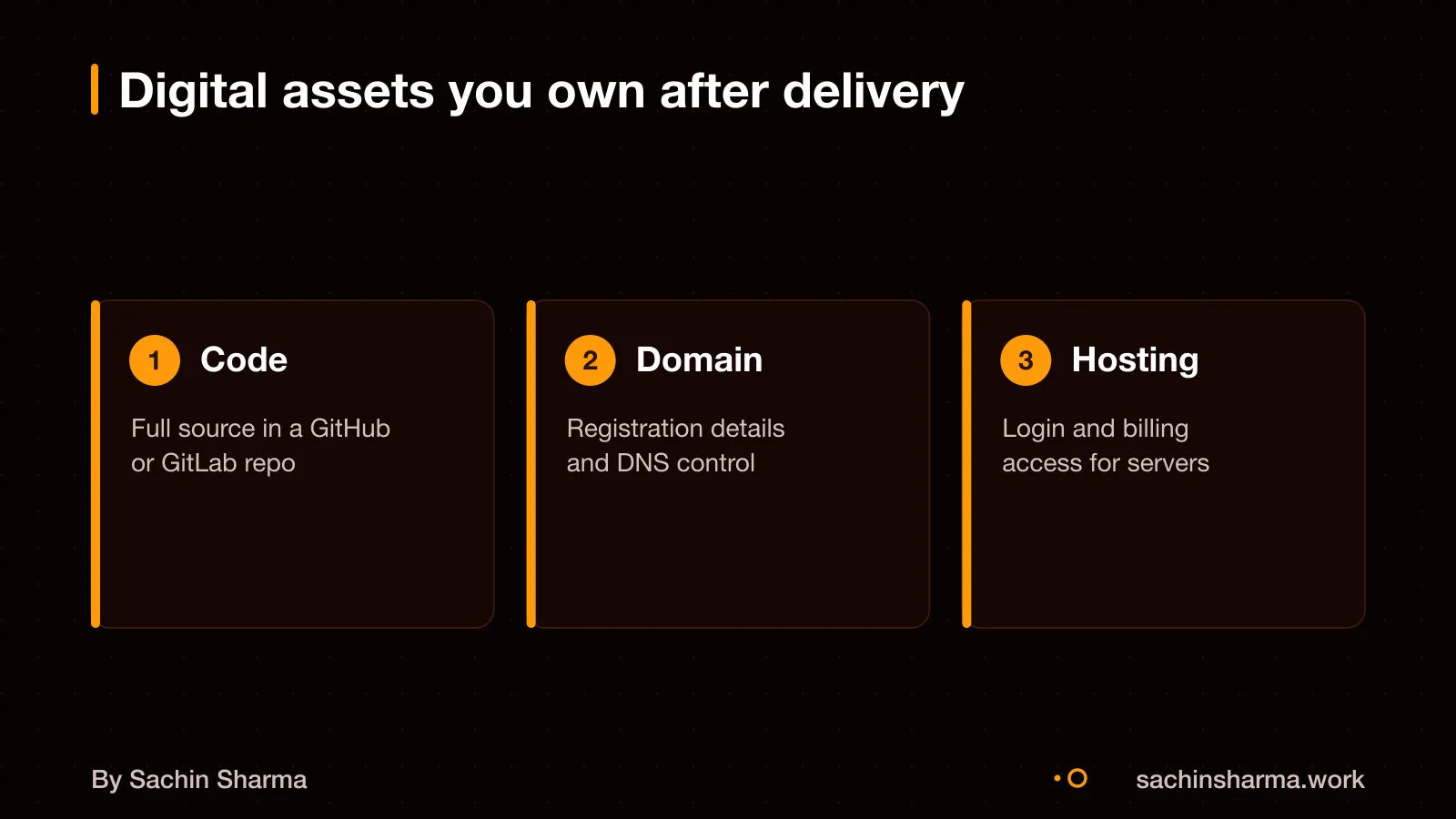
You own the code, domain, and hosting accounts once the project is complete and fully paid. I transfer the source code as a private repository or a final zip, with no strings attached. The domain and hosting accounts are either set up in your name from the start or handed over with updated credentials and access rights. You gain full control to manage, update, or move the app without needing me. This is standard practice for freelance developers working directly with clients. For example, in past projects like the family-run conglomerate’s multi-tenant platform, the client took full ownership of both code and infrastructure after delivery.
What support do you offer after launch?
You get bug fixes and minor updates for 30 days after launch at no extra cost. After that, ongoing maintenance is available as a monthly plan. This includes security patches, version updates, and performance checks. As an estimate, annual maintenance costs 15 to 25% of your initial MVP development spend.
Monthly support plans range from $500 to $5,000. Response time for critical bugs is within 48 hours, subject to agreement. I do not offer 24/7 support.
How do I start an engagement?
The first step is a scoping call where we discuss your idea, goals, and what success looks like for your web app or MVP. I will ask about the core problem you want to solve and who your users are. You need to share a clear goal and the main tasks your users should be able to do.
Next, I define the scope and break the project into milestones based on the core features needed to test your main idea. This becomes your MVP roadmap. I will list what is in and out of scope, so there are no surprises.
After you agree, we set a start date. I begin work on the first milestone. You will get weekly updates on progress, next steps, and any issues. No forms or sales teams are involved. You work directly with me.
When this is not the right move for your business
When this is not the right move for your business
A simple website is enough if you only need to share information, not collect data or let users take actions. For example, a clinic that wants to show its services and contact details does not need a web app. A static site with a contact form is faster and cheaper to build.
A no-code tool fits better when your needs are standard and your team can manage updates. Tools like Google Forms, Notion, or Zoho Creator can handle bookings, inventories, or internal workflows without custom code. Use them if you want to go live in days, not months.
You may need a native mobile app instead of a web app. If your users rely on offline access or device features like camera, GPS or push notifications. As per the evidence, a web app works smoothly on modern browsers. But it cannot match the performance of a native app in low-network conditions or for complex tasks. For such cases, consider a native solution like a Flutter app. Rescue a failed or abandoned app if you are already stuck.
Related reading: What an MVP costs, and what it should include, How to integrate Razorpay.
Assumptions behind the numbers
- Project complexity affects timeline and cost, defaults to 'standard'.
- AI features increase cost and time, defaults to 'no'.
- Third-party integrations increase cost and time, defaults to 'no'.
What is in it, and what is not
A working web app or MVP built in clear milestones, with full ownership handed over. Built to work on phones and rank on Google.
- 01Written scope and goals
Clear problem, success metrics and feature list agreed in writing before work begins.
- 02Design preview
Key screens and flows mocked up for your sign-off before code begins.
- 03Web app built in Next.js
Fast, SEO-ready and mobile-friendly by default. Works on all devices.
- 04Testing builds each milestone
Real URLs to test at the end of each phase, not a demo at the end.
- 05Deployment and handover
Code in your repo, domain and hosting in your name, with a short guide.
How it runs: milestones you can test
- 1Discovery and Scope
You can test: Agreed goals, feature list and timeline. You know what we're building and when.
- 2Build Core Flow
You can test: Main user journey working and testable on your device or browser.
- 3Add Features
You can test: All scoped features present and linked. Ready for feedback round.
- 4Launch and Handover
You can test: Live on your domain, code in your repo, keys and docs handed over.
Right for you if
- You have a clear problem and user in mind.
- You want a product that works on phones and ranks on Google.
- You prefer direct contact with the developer.
Look elsewhere if
- You want a no-code site or template-based build.
- You need native mobile features like Bluetooth or camera drivers.
- You want a fixed quote on a one-liner with no scope.
How it is priced
Price follows scope, not hours. You get a written breakdown before work starts, with cost split across milestones. Changes are handled by agreement, not surprise bills.
Questions to ask before you sign, with anyone
- Who exactly will build my product?
- What is not included, in writing?
- What can I test at the end of each week?
- Whose name are the domain and repo under?
- What happens if we pause midway?
Quick answers
Why Next.js and not WordPress?
Next.js is faster, secure and built for modern web apps. WordPress suits blogs and brochure sites.
Will my app work on phones?
Yes. I build mobile-first so your app works well on all screen sizes.
Do I own the code?
Yes. Code, domain and hosting are set up in your name from day one.
Can I add features later?
Yes. New features are scoped and priced separately in a fresh agreement.
What if I don’t like the design?
We agree on key screens before code. You can request changes during that stage.
How long till my app goes live?
Most MVPs launch in 6 to 12 weeks. Complex builds with AI or custom workflows take longer.
Is SEO built in?
Yes. Next.js gives strong SEO by default. We can add meta tags and structured data.
Questions people ask
An engagement starts with a scoping call to define your goals, success metrics, and the core features needed for your MVP. We then agree on a roadmap with clear milestones, scope, and timeline. This ensures we focus only on what is essential to test your idea in the market.
We use WhatsApp and email for all updates, with a weekly progress report on what was completed, what is next, and any blockers. This keeps communication clear and timely without slowing down development. The evidence on service worker APIs does not apply to client-developer communication.
You own the code, domain, and all accounts once the project is fully delivered and payment is complete. I hand over all access, source code, and documentation at the end. This is standard practice unless otherwise agreed in writing.
Yes, I can share real project examples on request, including web apps and AI-assisted tools built with Next.js and Flutter. These include internal platforms, habit trackers, and legal document assistants. Message me to see case details relevant to your needs.
Post-launch changes are supported through maintenance plans that cost 15 to 25% of the initial development cost annually. Minor updates and bug fixes are included, while new features are scoped and priced separately. Monthly support ranges from $500 to $5,000.
Yes, I build web apps with AI features like automated note-taking, document analysis, and personalised recommendations using Next.js and AI tools. See my AI feature development service for how I integrate AI into your app without complexity.
Delays are rare because we define scope and milestones upfront, and review progress weekly. If priorities shift or new features are added, we adjust the timeline together. Clear scoping and regular updates keep your project on track.
No, this service is for web apps and MVPs that run in browsers, not mobile apps. I do not publish on the Apple App Store or Google Play Store. For native mobile apps in Flutter, see my mobile app development service.